L444 Com Mobile App — APK Download

The L444 mobile app brings the full casino and sportsbook experience to your phone. Download the official APK for Android or install the lightweight iOS version - access 15,000+ games, deposit via bKash or Nagad, place cricket bets, and collect bonuses without opening a browser. The app weighs around 7-8 MB, supports Bengali and English, and lets you log in with a fingerprint or Face ID. Everything from slots and live dealers to the Reward Center is available in one tap.

Why Use the L444 App Instead of the Browser

Speed and stability are the two clearest advantages. The app loads game sessions faster than a mobile browser because it caches assets locally. Push notifications alert you to deposit bonuses and odds changes in real time - something a browser tab cannot do in the background.

The app also keeps your session active longer without re-login prompts, and Face ID or fingerprint login removes the step of typing a password every time. For players who deposit with bKash or Nagad, the in-app payment flow is smoother: choose the amount, confirm the channel, send the transfer, and enter the Trx-ID without switching between apps.

Exclusive mobile-only promotions are another reason to install. L444 periodically runs offers tied to the app download action itself - for example, a bonus for downloading and subscribing to the official Telegram channel with a 1x turnover requirement.

Key advantages at a glance:

  • Fingerprint and Face ID login
  • Push notifications for bonuses and live odds
  • Faster game loading with local caching
  • Mobile-only bonus offers
  • Bengali interface throughout
  • Integrated bKash and Nagad deposit flow
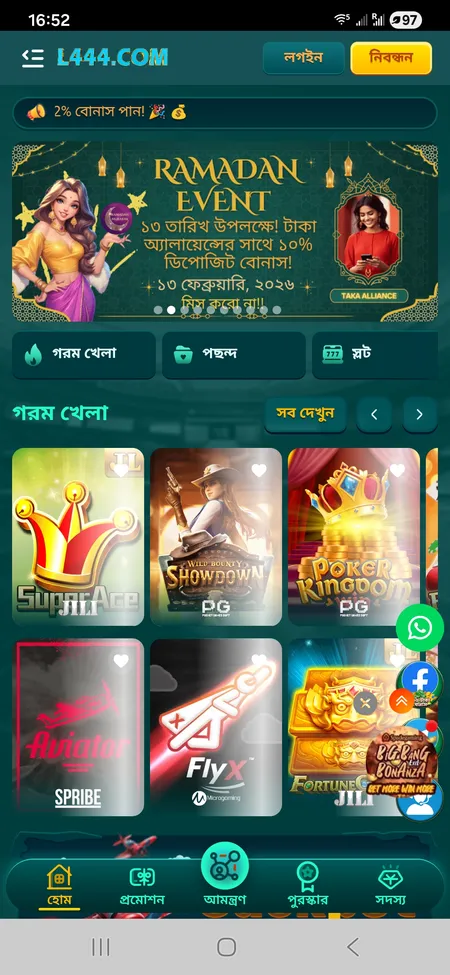
L444 app home screen with game categories

The main screen of the L444 app shows Hot Games, live balance, and navigation to Sports, Casino, Slots, and Fishing sections.

Visit L444 Official Site

How to Download the L444 App

The official download point is the footer of l444.org. Look for the block labeled 'Application Download' (এপ্লিকেশন ডাউনলোড). There you will find two options: Android APP and IOS LITE-APP.

Important: L444 is not available on the Google Play Store or Apple App Store. Do not download APK files from third-party sites or Telegram bots - only use the link on the official domain. Fake APKs have been reported in the ecosystem; the platform itself warns users in its deposit section about fraud attempts via Telegram and Facebook.

The official alternative domain for the app is l444app.net, which redirects to the same verified download.

Installing on Android - APK Step by Step

The Android APK is approximately 7-8 MB and installs in under a minute on any mid-range device.

Steps to install

  1. Open l444.org in your phone browser and scroll to the footer download block.
  2. Tap 'Android APP' to begin downloading the APK file.
  3. When the download completes, open the file. Android will prompt you to allow installation from unknown sources.
  4. Go to Settings - Security (or Apps - Special App Access) and enable 'Install unknown apps' for your browser.
  5. Return to the APK file and tap Install.
  6. Once installed, open L444 and log in or register.

Common errors

  • 'App not installed' - usually means an older version is already present. Uninstall it first, then reinstall.
  • 'Parse error' - the APK may be corrupted. Delete and re-download from the official site.
  • Device storage under 50 MB free can also block installation.
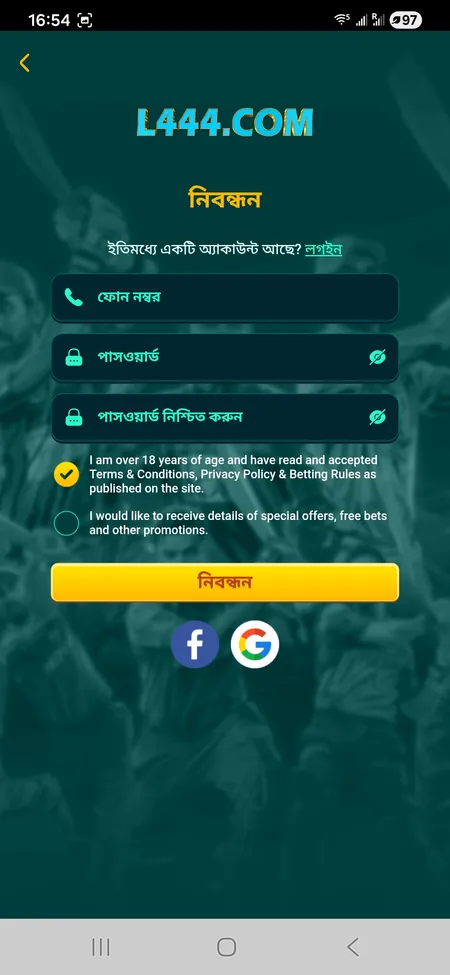
L444 registration form with phone number field

New users register with an 11-digit mobile number, password, and age confirmation. The process takes under two minutes.

Installing on iOS

Apple restricts sideloading APK files, so the iOS path is different. L444 offers an IOS LITE-APP listed in the same footer block on l444.org.

The most reliable method for iPhone users is the PWA (Progressive Web App) approach:

  1. Open l444.org in Safari.
  2. Tap the Share button (the box with an arrow).
  3. Select 'Add to Home Screen'.
  4. Confirm the name and tap Add.

The icon appears on your home screen and behaves like a native app - full-screen mode, no browser bar, and direct access to all sections. Sessions persist between visits.

Some iOS users may encounter a corporate profile installation prompt depending on the version offered at a given time. If prompted, go to Settings - General - VPN and Device Management and trust the profile before launching the app.

System note: iOS 13 or higher recommended. Older versions may not support the full PWA feature set.

Get the L444 App

System Requirements and Compatibility

Parameter Android iOS
Minimum OS version Android 5.0 iOS 13.0
File size ~7-8 MB PWA (no install size)
RAM recommended 2 GB+ 2 GB+
Internet 3G minimum, 4G preferred 3G minimum, 4G preferred
Installation source APK from l444.org Safari PWA or profile

The app runs on most smartphones sold in Bangladesh from 2017 onward. Older low-end devices with 1 GB RAM can run the app but may experience slower load times in live casino sections.

Login and Account Management in the App

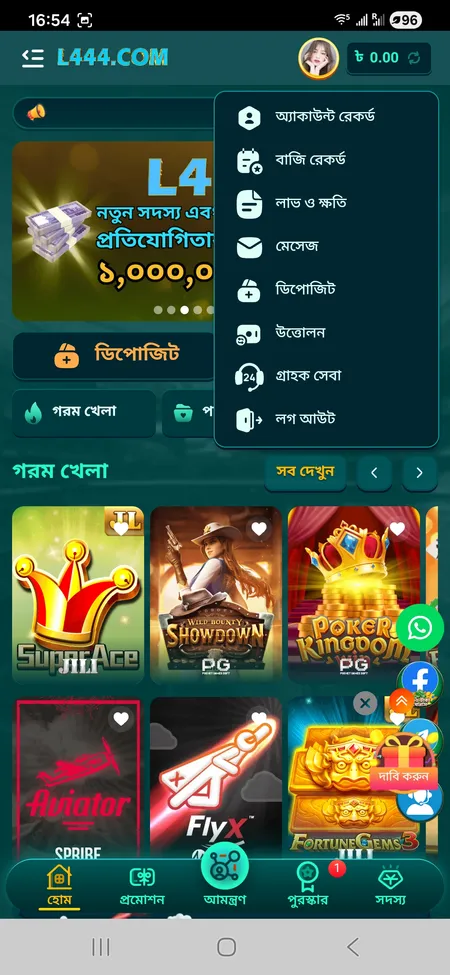
The login screen asks for your 11-digit phone number and password. The 'Remember me' toggle keeps you signed in between sessions. Fingerprint and Face ID are available after the first manual login - enable them in the app settings under security.

From the account menu you can access:

  • Bet history and profit/loss records
  • Transaction history (deposits and withdrawals)
  • Inbox for platform messages and bonus notifications
  • VIP level and upgrade progress
  • Support chat (24-hour)
  • Deposit and withdrawal forms

If you forget your password, the 'Forgot password' link on the login screen initiates recovery via your registered phone number. The platform also allows L444 login via Facebook or Google accounts linked during registration.

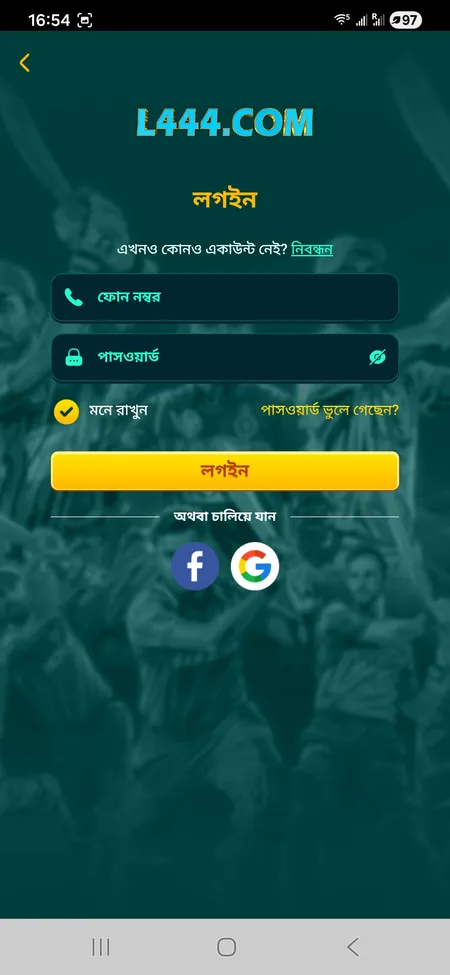
L444 login screen with phone and password fields

The login screen includes phone number, password, Remember Me option, forgot password link, and social login via Facebook and Google.

Bonuses Available in the App

The app unlocks a specific welcome bonus tied to the download action: install the app, subscribe to the official Telegram channel (t.me/L444officialchannel), and meet the minimum historical deposit threshold. Wagering requirement is 1x turnover, valid once per user.

Beyond the download bonus, all platform promotions are accessible from the app:

  • First deposit bonus up to 10,000 BDT
  • Weekly reload bonuses (30-50%)
  • Slot Loss Relief cashback with 1x wagering
  • Ramadan series events with red packet rain and cumulative recharge bonuses
  • Member Day monthly event with free bonuses based on activity
  • VIP monthly cashback up to 15%

The Reward Center in the app shows available coupons, countdown timers, and the spin wheel for Member Day missions. Collect and claim rewards directly without switching to a desktop browser.

For a full breakdown of all current promotions, see the L444 bonus offers page.

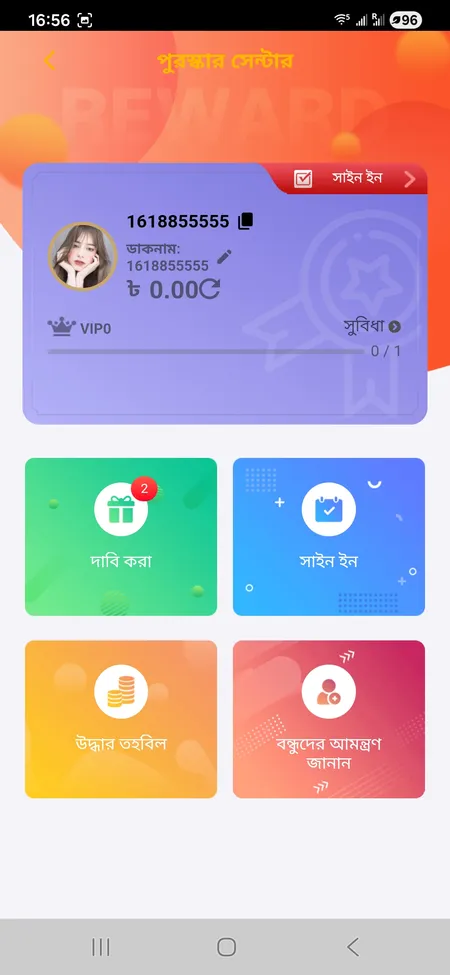
L444 Reward Center with claim buttons and spin wheel

The Reward Center shows active coupons, spin wheel prizes, and countdown timers for Member Day and seasonal events.

Claim Your Bonus

Games Available in the App

The full catalog of 15,000+ games is accessible from the app. The main categories appear in the bottom navigation and side menu:

  • Slots - JILI, PG Soft, Pragmatic Play, Spribe, and others; filter by provider or search by name
  • Live Casino - baccarat, roulette, blackjack, Teen Patti, Dragon Tiger with live dealers
  • Crash Games - Aviator with 8-15 second rounds and manual cashout
  • Fishing / Arcade - Happy Fishing, Ocean King, Mega Fishing, Jackpot Fishing from JILI and FC FA CHAI
  • Sports Betting - cricket, football, kabaddi, tennis, UFC, e-sports with live markets
  • Game Shows - Crazy Time, Dream Catcher, Monopoly Live
  • Lottery - dedicated section with draw schedules
  • Poker - separate room with its own category

Deposits and Withdrawals in the App

All payment actions happen inside the app under the Deposit and Withdrawal tabs. The account currency is BDT (Bangladeshi Taka).

Method Min Deposit Notes
bKash 200 BDT Enter Trx-ID after transfer
Nagad 200 BDT Enter Trx-ID after transfer
Rocket 200 BDT Trx-ID is 10 digits
Bank Transfer VIP only Contact support for details

After sending money via bKash or Nagad, you must enter the Transaction ID (Trx-ID) in the app form. Without it, the deposit will be delayed. The amount in the form must match your payment slip exactly. Do not send deposits via Telegram or Facebook messages from anyone claiming to represent L444 - only use the in-app deposit flow.

Withdrawals go to linked bKash or Nagad e-wallets. You can link up to 5 wallets. Processing time for verified accounts is 5-15 minutes according to platform statements; KYC verification may extend this to 1-3 business days in some cases. A transaction password is required to confirm each withdrawal.

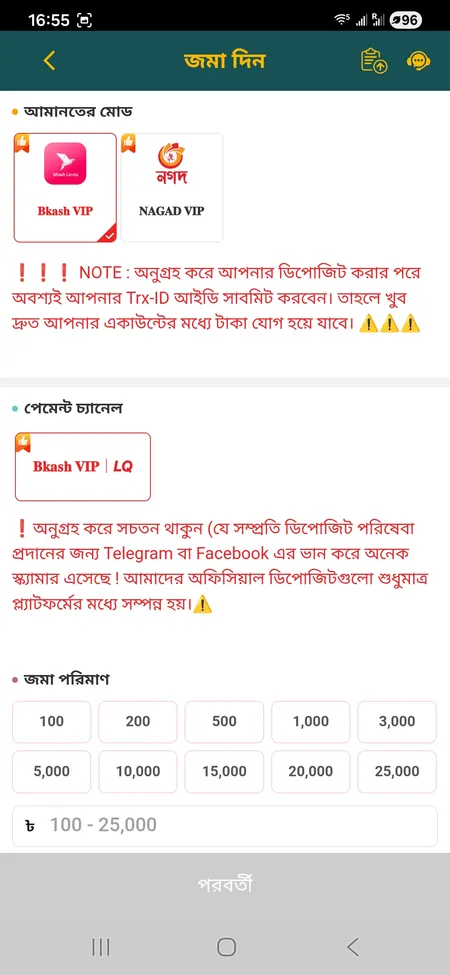
L444 deposit form with bKash and Nagad options

The deposit screen shows payment mode selection (bKash VIP or Nagad VIP), preset amount buttons from 100 to 25,000 BDT, and Trx-ID entry.

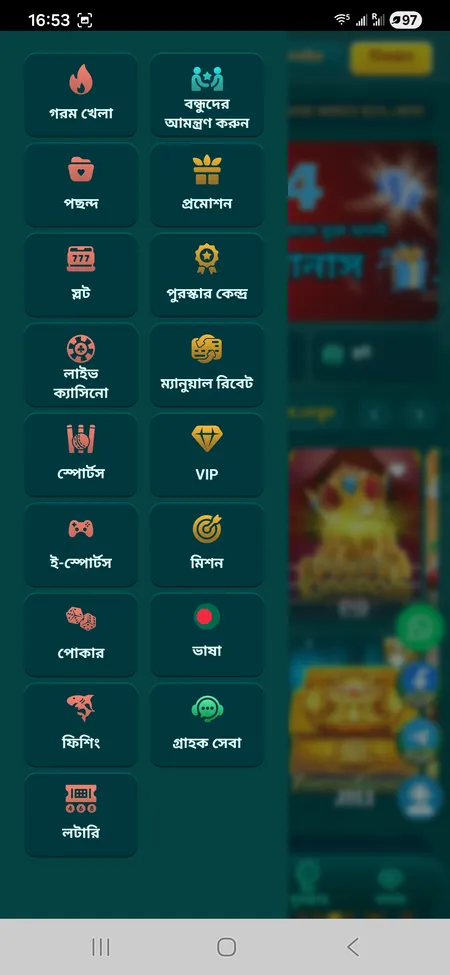
L444 side menu with game categories

Android APK Install

Download the 7-8 MB APK from l444.org footer. Enable 'Install unknown apps' in Android settings. Supports Android 5.0 and above. Fingerprint login available after first session.

L444 account menu on home screen

iOS PWA Install

Open l444.org in Safari, tap Share, then Add to Home Screen. No App Store required. Runs full-screen on iOS 13+. The IOS LITE-APP option is also listed in the site footer for alternative install.

App Security and Data Protection

The L444 app uses SSL encryption for all data transmitted between the device and the server, including payment details and personal information. This is the same certificate active on the l444.org domain.

Account security features available in the app:

  • Fingerprint and Face ID login
  • Transaction password required for withdrawals
  • Session monitoring with auto-logout option
  • Anti-fraud rules: multiple accounts from one phone number are flagged and may result in bonus cancellation

The platform's Privacy Policy and Terms are accepted during registration. KYC verification (NID or passport plus proof of address) may be requested before large withdrawals are processed. Two-factor authentication settings are referenced in external guides for the platform, though the in-app 2FA flow is managed through the account security section.

For questions about your account security, the 24/7 support team is reachable via the in-app chat, WhatsApp, or Telegram at t.me/L444officialchannel. You can also visit the L444 home page for the latest security notices.

Updating the App

L444 does not use automatic updates through an app store. When a new version is released, you will typically see a prompt inside the app or an announcement in the Telegram channel.

To update on Android:

  1. Download the new APK from l444.org (the version number will be listed, e.g., v2.4.x).
  2. Install over the existing app - your account data and saved wallets are preserved.
  3. If the install fails, uninstall the old version first, then install the new APK.

For iOS PWA users, updates apply automatically when you open the app in Safari - no action needed as long as you saved the site to your home screen from the official domain.

Ready to play on mobile? Download the L444 app from the official site and get access to 15,000+ games, bKash deposits from 200 BDT, and your welcome bonus in one tap.

Frequently Asked Questions

Where do I download the L444 app?

Download the Android APK or iOS LITE-APP from the footer of l444.org under the 'Application Download' section. The alternative official source is l444app.net. Do not use third-party sites or Telegram bots.

Is the L444 app on Google Play or the App Store?

No. The app is not available on Google Play or the Apple App Store. Android users install the APK manually; iOS users use the PWA method via Safari or the IOS LITE-APP from the official site.

What Android version do I need?

Android 5.0 or higher. Most smartphones sold in Bangladesh from 2017 onward are compatible. 2 GB RAM or more is recommended for smooth live casino performance.

How do I enable installation from unknown sources on Android?

Go to Settings, then Security or Apps, find Special App Access, and enable 'Install unknown apps' for your browser. This allows you to install the L444 APK outside the Play Store.

Can I use fingerprint login in the app?

Yes. After your first manual login, go to the security settings in your profile and enable fingerprint or Face ID authentication.

How do I deposit via bKash in the app?

Open the Deposit tab, select bKash VIP as the payment mode, choose your amount, complete the transfer in your bKash app, then return to L444 and enter the Transaction ID (Trx-ID). The amount must match your payment slip exactly.

How long does a withdrawal take from the app?

For verified accounts, L444 states 5-15 minutes. If KYC verification is pending, processing may take 1-3 business days. Withdrawals require a transaction password and a linked bKash or Nagad wallet.

What happens if the APK install fails?

A 'parse error' usually means the download was incomplete - delete the file and re-download from l444.org. An 'app not installed' error usually means an older version is still present - uninstall it first, then try again. Make sure you have at least 50 MB of free storage.

Does the app have a bonus for downloading?

Yes. Download the app, subscribe to the official Telegram channel, and meet the minimum historical deposit threshold to claim the mobile download bonus. Wagering requirement is 1x turnover, valid once per account.

How do I update the L444 app?

Download the latest APK from l444.org and install it over the existing version. Your account data is preserved. iOS PWA users receive updates automatically when opening the saved site in Safari.